 FanCam AI
Looks like a real TV shot
Long-lens framing from across the stadium, fans around you at the same scale, eyes on the field until the camera finds you.
AI fan cam maker
Upload one photo. FanCam AI puts you (or your dog) in a roaring crowd and makes a 10-second fan cam that looks like the jumbotron feed: live scoreboard, stadium sound and a wave to the camera. No prompt to write.
 AI-generated from this one photo
How it works
A clear selfie, a friend who's in on the joke, or your dog. One photo is enough.
Pick soccer, basketball, American football or baseball, then type the teams, the score and the clock.
Drink, popcorn, hot dog, pom-poms, foam hand or a flag. Every fan needs something in hand.
In a few minutes your fan cam is ready: you in the stands, spotted by the camera, waving back.
Real result
Every FanCam AI clip follows the beats of a real broadcast crowd shot. These frames come from one unedited app output, made from a single photo of a poodle on a sofa.
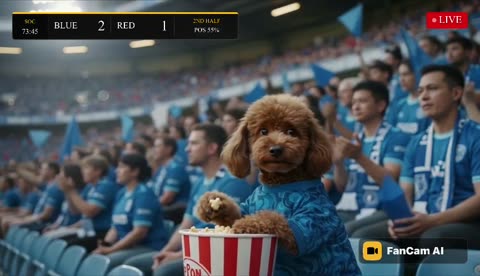
Snacking and watching the field like everyone around you.
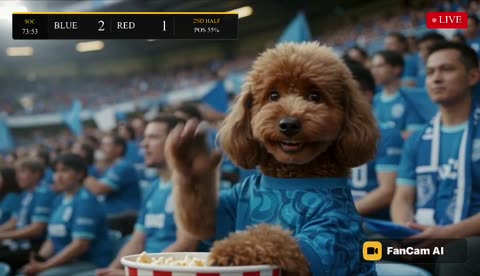
The broadcast camera finds you. Cue the double-take.
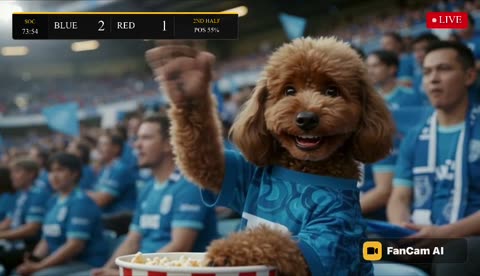
You turn to the lens and wave back. Ten seconds of fame.
Features
Long-lens framing from across the stadium, fans around you at the same scale, eyes on the field until the camera finds you.
Team names or colors, score and game clock in broadcast, compact or ticker style, with an optional red LIVE badge.
Pick from menus instead of crafting prompts and juggling an image tool plus a video tool.
Drink, popcorn, hot dog, pom-poms, foam hand or flag, held naturally through the whole clip.
Put yourself, a friend, or your dog in the crowd. Pets get a jersey and snacks too.
Choose 480p or sharp 720p HD, and switch the FanCam watermark off in Settings whenever you like.
Watch real example fan cams inside the app before you spend a single credit.
No subscription. If a video fails to generate, its credits come back automatically.
Why people make them

Pricing
10 credits
Great for stories and group chats.
20 credits
Sharper detail for posting and big screens.
Free to download. There are no free credits; packs are bought in the app: 20 credits $2.99 · 60 credits $6.99 · 150 credits $12.99 (US App Store, October 2026; prices vary by country). Credits for a failed video are returned automatically.
FAQ
FanCam AI (on the App Store as "FanCam AI: Fan Cam Video Maker") is an iPhone and iPad app that turns one photo into a 10-second, broadcast-style fan cam video. The person in the photo, or your pet, appears in a packed stadium crowd, gets caught on the big screen, reacts and waves at the camera, with a live scoreboard and stadium sound.
Download FanCam AI, upload one clear photo, pick the sport, team names, score and game clock, choose what you are holding (drink, popcorn, hot dog, pom-poms, foam hand or flag), then tap Generate Fan Cam. When the video is ready you can save it to Photos or share it anywhere. See the step-by-step guide.
No. You choose the photo, sport, teams, score, clock and prop from simple menus and FanCam AI builds the scene. The do-it-yourself route is to generate a stadium image with ChatGPT or Gemini and animate it with a video model such as Kling, which means writing a long prompt and using two separate tools. Compare the two routes.
The app is free to download, and you can watch real example fan cams in it before paying. There are no free credits, so you need a credit pack before your first video. On the US App Store (October 2026) packs cost $2.99 for 20 credits, $6.99 for 60 credits, $12.99 for 150 credits. A 480p video uses 10 credits and an HD 720p video uses 20, so a 480p video costs about $0.87 to $1.50. There is no subscription, and if a video fails to generate its credits are returned automatically.
Generation usually takes a few minutes. Keep FanCam AI open until it finishes (it keeps your screen awake), and every finished video is saved in History on your device so you can come back to it later.
Yes. FanCam AI works with pets as well as people. Upload a clear, front-facing photo of your pet and it will be placed in the stands in your team's colors, holding popcorn or a drink like any other fan. See dog fan cams.
Soccer (football), basketball, American football and baseball. Each has its own stadium and a matching scoreboard: a match clock for soccer, a game clock for basketball and American football, and innings for baseball.
Yes. You type the two team names (or colors), the score as X-Y (for example 2-1) and the game clock or inning, and pick a broadcast, compact or ticker scoreboard with an optional LIVE badge. Like real TV graphics, the scoreboard shows team names as short codes: names of up to 4 letters appear in full, longer single words become 3-letter codes and multi-word names become initials. You can check the scoreboard preview before generating.
Not on the real one, but FanCam AI makes a video that looks like the jumbotron feed: you in the stands, spotted by the broadcast camera, waving back. It is AI-generated, so it is for fun and sharing, not proof that you were there.
Not yet. FanCam AI is on the App Store for iPhone and iPad and needs iOS or iPadOS 17 or later. (Samsung's My FanCam on Galaxy phones is a separate, unrelated feature.)
No. FanCam AI is an independent app for iPhone and iPad by Ege Alp that creates a new stadium fan cam video from one photo. Samsung's My FanCam is a Galaxy phone feature that re-frames a video you already recorded to follow one person. The two are not affiliated.
Videos can carry a small FanCam AI watermark, and you can turn it off at any time in Settings.
A clear, well-lit photo where the face is visible and facing the camera works best. Only use photos you have the right to use: yourself, friends who agreed, or your own pet.
If a video fails to generate, its credits are returned automatically. Refunds for App Store purchases are handled by Apple at reportaproblem.apple.com. For anything else, email [email protected] or use the contact page. You can delete your account and data in Settings → Delete Account & Data.
One photo. Ten seconds of fame.
Download on theApp StoreLast updated October 2026